
Here are some of the symbols found on Mac OS keyboards:
- Command (or Cmd) ⌘
- Shift ⇧
- Option (or Alt) ⌥
- Control (or Ctrl) ⌃
- Caps Lock ⇪
- Fn


Text Editing Keyboard Shortcuts:
| Shortcut | Description |
| Fn + Backspace | Forward delete |
| Shift + Ctrl + LeftArr , then LeftArr. | Beginning of line (Home) |
| Ctrl + A | Beginning of line (Home) 2 |
| Shift + Ctrl + RightArr , then RightArr. | End of line (End) |
| Ctrl + E | End of line (End) 2 |
| Option + LeftArr | Move cursor left per word |
| Option + RightArr | Move cursor right per word |
Global Shortcuts:
| Shortcut | Description |
| Fn + F11 | Toggle hiding app windows – showing Desktop |
| Command + Option + Esc | Quit an app |
Boot / Startup Shortcuts (Apple Silicone):
| Shortcut | Description |
| hold: Power Button | Recovery / Startup Manager / Safe Mode |
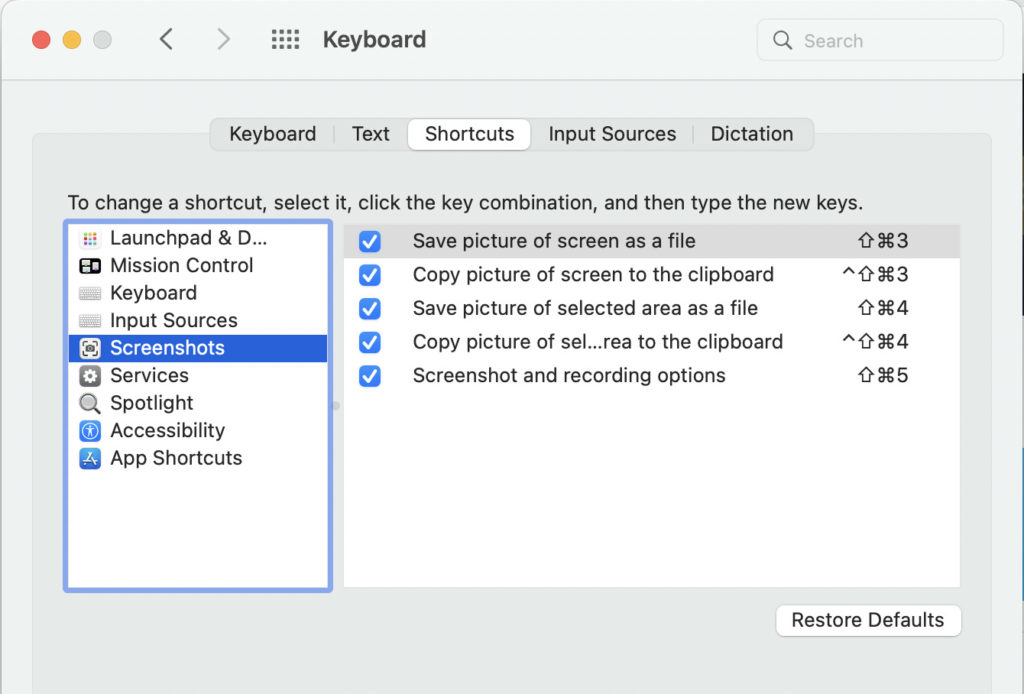
Where to find current shortcuts
From the App menu > System Preferences > Keyboard > Shortcuts.
By double-clicking a shortcut, you can change it and type a new one.